One of the biggest things that people wonder is: What is CRM? They may have heard of it, but aren’t really sure what it means or why it’s important. CRM stands for Customer Relationship Management. Many companies decide to use these types of systems because it makes keeping customer data secure and organized. It can also help improve customer satisfaction and customer experience.
Since customers are the thing that keeps a business going, it’s crucial to manage customer information. Losing or letting this information be stolen can lead to catastrophic consequences. There have even been times when a business goes out of business because it couldn’t keep this information where it needed to be.
One of the best things about this kind of system is that any information relating to the customers can easily be updated. This means if there’s something like a new interaction or new contact information, it can all be added with just a push of a button. This can keep everyone on the same page and prevent people from referring to old data.
If you aren’t really sure what the benefits of a CRM is or why it’s so important, keep reading to get some good information on these systems. You might be surprised how much they can benefit your company and you might realize that things could be done a lot easier!
What is CRM (Customer Relationship Management)?
CRM is used to manage customer contacts and customer data. Basically, a CRM (Customer Relationship Management) is somewhere where you can keep all of these things organized. Since everything is kept in one place, you can easily find what you’re looking for and record any new data or interactions you have with customers.
It can also be used to share data with other employees, such as sales teams or people working on marketing campaigns. Not only will this make it much easier for everyone to find what they need, but it will save time because you won’t be spending all day on the phone trying to give others the information they’re looking for.
It can also help people pay attention to customers and make sure that big accounts or opportunities aren’t missed or lost. This is especially true for companies that have hundreds of interactions with their customers per day. When there’s that much traffic, it’s easy to lose important information in the hustle and bustle! A CRM stops that from happening.
All-in-all, a CRM is there to help you have a better relationship with your customers. In this day and age, it can be hard to connect with people and you want to have the best connection you can. Not only will this make your customers feel wanted, but it will also give you an edge over the competition.
Who Should Use CRM Systems?
While a CRM system could be beneficial to pretty much any company, the ones that deal with hundreds of customers should definitely be using this type of software. Since this amount of leads can be lost in the chaos, you want to make sure you have a way to keep all data and interactions recorded. The last thing you want is to lose out on leads because you don’t have immediate access to their information.
If you feel like you’re losing sales because of unorganized information, want to keep all interactions with customers in one easy to access place or want to track your sales and leads, then a CRM might be right for your business. While it will cost some money to get started, you’ll be able to see how your business does with the system.
Keep in mind, a CRM doesn’t work for you, you can always cancel your subscription and stop using it. You could also choose to use a different CRM to see if you get better results. It might not seem like a big deal, but different systems will have different features and some will be much easier to use than others.
You really don’t have anything to lose. It’s either going to really help your business grow or it’s going to be something that isn’t really that beneficial. In the big scheme of things, paying to try a CRM for a few months isn’t really going to be a deal-breaker!
What Does CRM Mean in Business?
When it comes to a business, the relationship with customers should be one of the highest things on the importance list. While some companies don’t think it’s a big deal, customers are what make your business. To be honest, no customers means no business and you could face some pretty bad consequences.
In order to keep a business running smoothly and the way it needs to, everything needs to be organized and kept in one place. Not only will a CRM allow you to record all interactions you have with customers, but you’ll also be able to record all of their contact information and any other important details you have about them.

When people call or contact a business, they don’t want to wait forever for the company to get their information up. They also don’t want to have to go over every past interaction they’ve done. This is especially true for those customers who are contacting the company multiple times for the same thing. By using a CRM, the person at your company can bring up the customer’s info with a few button pushes. They’ll be able to get right to it and jump right into helping the customer.
The last thing a business wants is the reputation of not being able to keep their customer’s information secure or not being able to have positive interactions. Many people will tell others about their experiences, so a few bad experiences could end up losing you more than just one or two customers! You want to be on the top of your game every time!
Important CRM Stats for Businesses
a. CRM has been known to increase sales by up to 29%, productivity by 34%, and forecast accuracy by 42%.
b. Businesses with CRM improved their sales leads by 44%, 45% increase in customer retention, and 52% increase in integrating with other business apps.
c. 65% of sales professionals who adopted mobile CRM, were able to reach their sales quotas.
d. Sales representatives can reduce lead costs by 23% using CRM.
e. CRM can boost conversion rates by 300%.
f. 74% of users believe that CRM software enhanced their access to customer data.
g. 47% of CRM users claimed that CRM greatly improved their customer retention rates.
h. Data accessibility is capable of shortening the sales cycle by 8–14% on average.
i) 65% of companies who use mobile CRM achieved their sales quotas, whereas only 22% of companies without mobile CRM achieved their sales quotas.
j) 87% of the companies that use cloud-based CRM, 13% are using on-premise CRM.
k) 91% of businesses with over 11 employees use CRM, compared to 50% of those with 10 employees or less.
Source from;
– https://financesonline.com/crm-statistics-analysis-of-trends-data-and-market-share/
– https://www.superoffice.com/blog/crm-software-statistics/
How to Use CRM for Marketing Strategy
Marketing campaigns can be huge for a company. This is a great way to generate more leads and get more customers. This is even more true for those companies that are just starting out or ones that have kind of hit a plateau. The more customers and sales you can get, the better your company is going to do.
To use a CRM for marketing campaigns, all you have to do is look for customers or leads that are related to the thing you’re trying to promote. For example, if you’re trying to promote some of your products, you can look in your CRM for customers or leads that are related to the specific products.

Once you find the people you’re looking for, you can use the contact information listed in the CRM to reach out to them. You can talk to them and see if they’d be willing to advertise on their platforms. Not only can this get you more sales, but you might get more leads. More leads can lead to you being able to advertise even more. All in all these campaigns can really help your business grow and prosper!
It might not seem like a big deal to do these types of campaigns, but you can’t get more customers without people knowing about you. Even if you’re getting more customers through word of mouth or referrals, you want to try and expand to as many areas as possible to bring in as many customers as you can.
2 Types of CRM System
The 2 main types of business CRM systems are cloud-based CRM (aka mobile CRM) and on-premises CRM. Both of these business CRM systems can be extremely helpful and they can both be used pretty interchangeably. Most of the time, all of the information will be available on both types of systems. Keep reading to learn more about each type of system.
Cloud-Based CRM
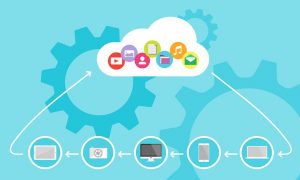 In short, a cloud-based CRM or mobile CRM is any type of CRM system that’s kept on a cloud and delivered to people through the internet. This means that all information pertaining to the customer, including interactions and information, are stored in the cloud.
The good thing about this type of CRM is that the person needs to have certain information to access the data. This can either be a login or some kind of link that is sent out. Regardless of the method, these tend to be very secure since it can only be accessed a few ways.
On-Premise CRM
 An on-premise CRM is one that is hosted right on the company’s personal server. This means that anyone who doesn’t have access to the actual server can’t see any of the information that’s stored in the CRM.
This is also pretty secure, but there’s a chance that a good hacker can hack right into the server. This is a huge liability because you really don’t want any of this information stolen or destroyed. If that happens, the news can get out pretty quickly and you can easily lose potential or existing customers!
Some companies even choose to use both kinds of systems. Not only will this let all employees, including remote workers, have access to customer information, but it will also allow your company to have a backup of the information if something happens. You’ll have to look at prices and features to see if this is something that will be beneficial to your company.
Does my Business needs CRM?
Before deciding whether or not your business needs CRM solutions, you need to answer a few questions. These questions will give you a pretty good idea of whether or not the software will benefit you. Remember the C and R stands for customer relationship, which is one of the most important parts of a business. Take a look at the questions and answer below to help guide you through your decision.
1. Is My Company Ready for CRM Systems?
The biggest question most companies have is whether or not their companies are actually ready for this type of system. The good news is that there are a few things that will let you know if your company is ready. If you have the things listed below, then chances are that your company could benefit from this software.
- A lot of customer data.
- The need for managing customer information.
- The need to improve customer satisfaction.
- The desire to improve the customer experience.
- The desire to improve customer relationships.
- The desire to improve customer interactions.
- The desire to improve existing customer contacts
- Helping improve customer encounters and bringing in potential customers.
- The need to improve sales and marketing.
- The need to improve management systems.
Even if you only answered yes to a few of these questions, you should still consider using a CRM. It’s a great option for most businesses and you don’t have to worry about features you can’t use or ones that aren’t beneficial because most CRM companies offer many different tiers and prices. You can just look and see which one meets your needs the best.
2. Which CRM Features are Necessities?
With the CRM tool, there are some CRM features that are much more needed than others. These features are ones that are going to help the entire process go much easier and keep all the information for your customers in one place. Looking at the various CRM solutions will show you that each one has different features, but many are the same. Some of the most important features are listed below.
- Good customer support.
- Contact management and lead management.
- Easy sales process.
- Better sales team management.
- Easier sales and marketing process.
- Easy way to make essential phone calls.
- Easier marketing campaigns.
If you aren’t really sure about which features you need, you should do as much research as possible. This will give you the best heads up for when you do finally get the software. Not only do you not want to be stuck with features you don’t need, but you don’t want to be stuck with ones you don’t know how to use.
3. What is my CRM Software Data Structure?
If you or your business isn’t in the technology field, then there’s a high chance you’ve never heard of data structure and you aren’t really sure what it is. In short, your data structure is going to be the way you group your information. This counts for potential customers and managing customer data for the existing customer you already have.
Remember the C and R stands for Customer Relationship, which is something you want to be at the top of your importance list. For the most part, your data structure should follow the same structure as listed below.
- Set up contact information for every CRM customer.
- Link CRM customer contacts to their respective organizations.
- Tag the correct organizations for each customer.
- For each contact, use a tagging structure for their personal information.
- Arrange pipelines and follow opportunities.
While you can add any additional parts you want, you should have at least the structure listed above. Removing anything can make things not go as smoothly as they can and you might be missing out on a lot of information and leads!
4. How Can I Transfer Existing Data?
Since customer experience, customer satisfaction and customer relationships are high on the importance list, the last thing you want to do is accidentally lose any of their data. This means it’s extremely important to transfer all of the necessary data. Not only will this keep customers happy, but it will also improve customer encounters.
The good news is that a CRM tool usually has a ton of options for importing data. This means that you can get all the important data imported with just a push of a button. You won’t have to manually enter anything because the management software will do that for you. If you still aren’t sure how to do this with the management systems you chose, there should be a help or tutorial button to help you.
If you can’t find these buttons, you might need to call the software company’s service desk. They should be able to walk you through the steps you need in order to do what you need to. They might also be able to give you some additional information on tutorials that will help you.
5. What Integrations are Needed for CRM Solutions?
Integrations are an essential part of management software. This is mainly because so many businesses use 3rd party companies to help everything run the way it needs to. The great news is that these types of systems can help you get rid of the countless apps you use by putting everything together. Some of the things that you’ll need to integrate are listed below.
- Combining all customer interactions into interaction histories.
- Transfer all quotes or proposals.
- Start using outside archives for documents.
- Sending out new leads to all email systems.
- Copy any events or tasks to smartphone calendars.
Just like the data structure, you can add more steps to your integration. The important things are that everything is transferred over and you don’t miss any important information. As long as you have everything you need, you shouldn’t have to worry about anything.
6. Who Needs Access to CRM Systems?
Since CRM has things that could be considered confidential, you need to make sure that anyone that sees the information will keep in under wraps. With that said, though, it’s a good idea to have the system available for anyone who might need it. This includes members of the sales team! If it’s easier, have people log in with personal credentials, so access records can be kept. Some of the people that need to be able to access these systems are listed below.
- Anyone working with the company for marketing campaigns.
- Sales teams
- Contact management members
- Any person working with customer service or customer support. This includes people doing phone calls and working the sales process.
For the most part, you want to have this system available to as many people at your company as possible. With that said, though, try not to give this information to many people outside of the company just because that can lead to a leak of info.
7. Who Will “Own” the CRM Systems?
Since so many people will have access to the system, things can get pretty crazy. While you could use personal credentials to keep track of logins, there’s a chance that things might still get hectic. Since this is the case, there needs to be an “owner” of the system. This person will be responsible for the system, including whether it succeeds or fails! When looking for the perfect person for this, they should also be able to do well in the areas listed below.
- Implementation: They should be able to easily get things up and running.
- Policies and Procedures: They should be able to understand and follow any procedures or policies for the system.
- System Policing: They need to be able to monitor things and bring consequences to those that aren’t doing what they’re supposed to do.
- Security: They need to be able to keep everything secure and prevent any information from leaking or being destroyed.
If need be, try looking at current employees’ past work performance or hold interviews for them. If you can’t find a suitable person that already works for your company, you might need to hold interviews to bring someone in. If you go this route, make sure that person signs paperwork that will prevent them from leaking any customer information.
8. Do I Need a CRM Software Consultant?
For the most part, there are 3 different types of consultants you can hire. These are CRM experts, IT consultants, and sales process consultants. Whether you need one or not is going to be up to you, but you should consider it if you’ve never used a CRM system before. You should also consider using one of the systems is really complicated or hard to navigate.
If you do decide you need a consultant, you want to make sure you hire the correct one. Make sure you hold interviews and have them show you some past work or how they do in action. You don’t want to hire someone, then find out that they really aren’t good at their job!
9. What Will the CRM Systems Cost?
The exact cost is going to differ from place to place, but there’s going to be fees regardless. Most places will give you an outright quote, but some will make you do all kinds of stuff just to get it. Some of the things you can expect to be included with the cost are listed below.
- Fees for a consultant.
- Costs associated with training.
- Subscriptions for 3rd party integration.
- Opportunity costs
Keep in mind, some systems might have other fees that are unique to their company or business. The best way to find out is to ask the company questions and see what works best for you. Another thing to remember is that there might be some fees that aren’t immediately talked about upfront. It’s always a good idea to ask and get this information so there aren’t any surprises.
10. Will the CRM Software Meet My Future Needs?
The biggest thing to keep in mind is that you want a CRM that’s going to meet your needs for a long time. With that being the case, don’t choose a system that only looks good for your present circumstances. Looking into the future will help you save money and time. Look and see if the system you’re considering has options that can grow with you, instead of options that are good just for the here and now.
If you aren’t really sure, you can always try and ask these questions to the company. Make sure to ask questions that can’t have biased answers because many companies will say what they need to in order to make a sale!
11. How Will I Measure ROI for the CRM Software?
ROI is extremely important for any business. You want to make sure your business is growing and the CRM system you chose is working well for your company. You can measure ROI by looking at the past information to see how it’s going.
Remember, while it’s important to make money in your business, you also want to make sure that the customer experience and customer satisfaction is high on the list. After all, no customers mean no business! The happier the customers are, the more business you’re going to get!







 Enterprise resource planning (ERP) isn’t without its challenges. Like any other acquired data system, ERP, if not applied correctly can result in serious financial costs to the organization.
 Since successful ERP implementation is critical to any organization’s success, the factors necessary to achieve this should be given their due diligence. So, let’s have look at the most important points to consider.
 Cloud technology is the new catchphrase around upgrading your traditional software programs. This upgrade has made its way into current ERP systems as well. Cloud platform services are exponentially improving the efficiency of organizations investing in ERP software.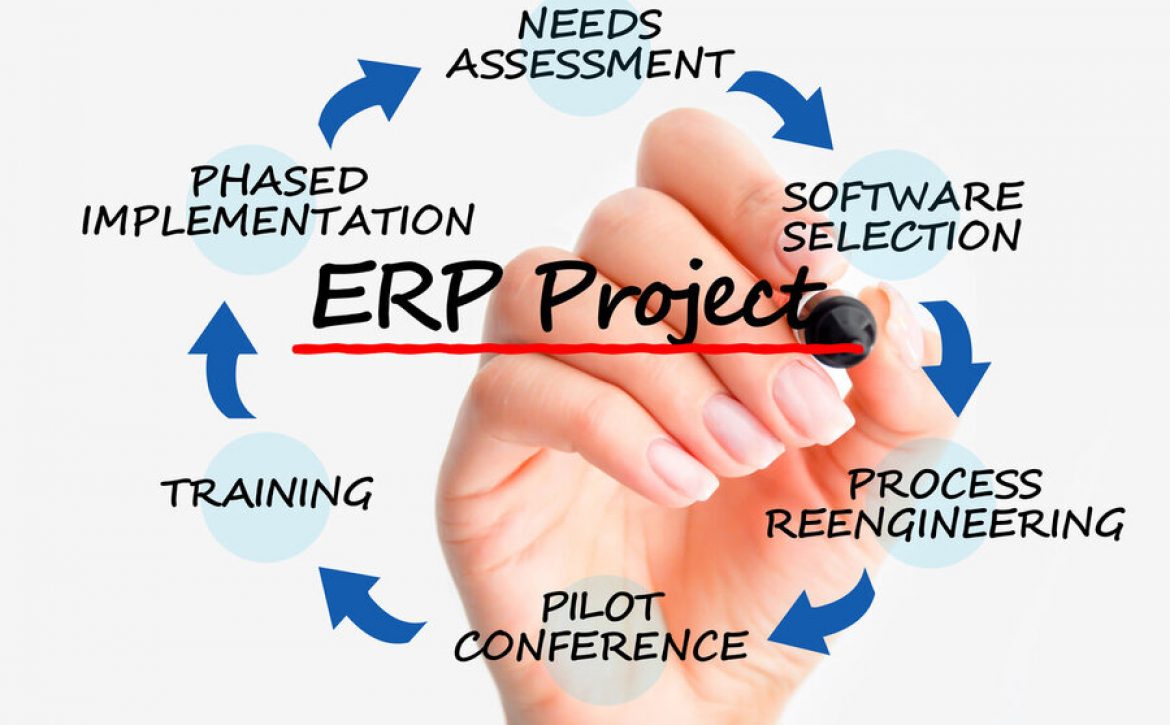
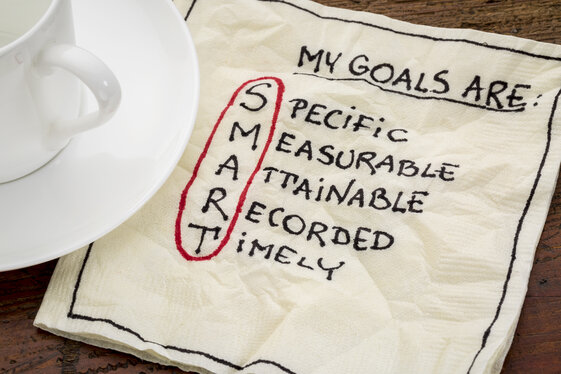 Before any new system is acquired, it’s crucial to establish the business needs going forward. This is done by drawing up a list of goals that you require the new software to fulfill. Goals need to be realistic and should be possible to achieve during the various implementation processes.
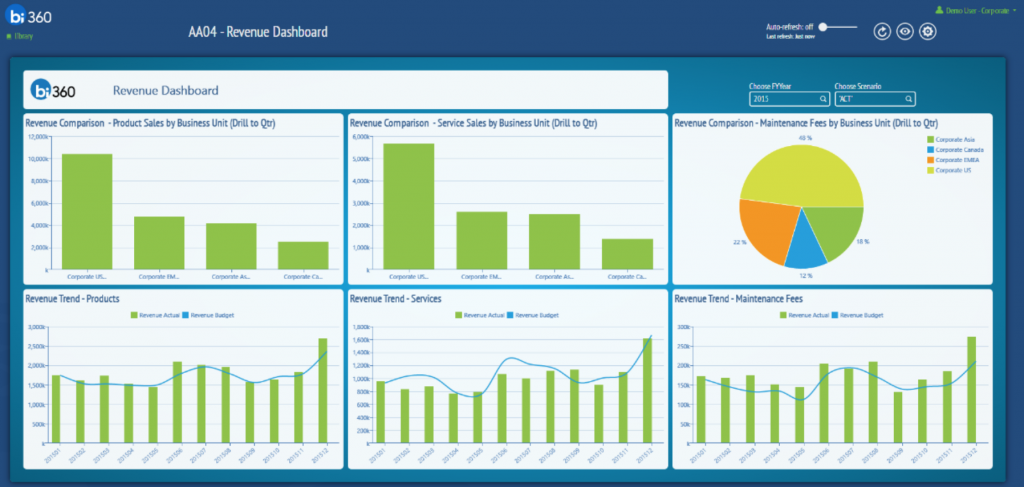 ERP can report required analysis to end-users. Tools to provide these reports are usually made up of the following:
 The success of any new ERP system largely depends on the training and engagement of the staff that is going to use it. These staff members are commonly referred to as the end-users. They’re the employees who’ll use the system to deal directly with the company’s customers.

 There’s no disputing that today’s market offers you many user-friendly products that can help you manage your business a little easier.